See the app as someone else sees it
Checking what a coach or a lead actually gets on their screen.
Open the menu under your name and find “Viewing as”.
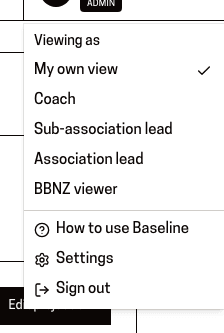
You'll know it worked when: A list of roles you can look through, and a “Coach” option for acting as one particular person.
An admin can preview any role. An association lead or sub-association lead can only act as one of their own coaches.
Choose the role, or the coach, you want to see as.
You'll know it worked when: The whole app switches to their view — including Settings and these how-tos, which now show that role's instructions.
Useful when someone describes a problem over the phone — you can look at what they're looking at.
When you're done, open the same menu and choose “My own view”.
You'll know it worked when: A message saying “Back to your own view”, and your own role again.
Your real account is never changed by this. It only affects what this browser shows you.
This page is for: Admin, Association lead, Sub-association lead.